Context
Vori
Invoice Mapping
Grocers hit the same wall every week: vendor invoices that wouldn’t go through, sometimes sitting for days and holding up stock they were waiting to put on shelves and sell. The hold-up was one confusing step they couldn’t sort out on their own, so they had to email Vori’s support team and wait.
Role
Product Design Lead
Timeline
May 2026 – June 2026
Skills
UX Research · Interaction Design · Prototyping · Usability Testing · Design Systems

Overview
A back office that couldn’t move forward.
Vori is the software independent and regional grocers use to run their store from point of sale to ordering and inventory. When a vendor invoice comes in, every item on it has to be matched up before that stock can hit the shelves. Each item connects to two things: the product shoppers buy, and the vendor’s version of it, which holds the cost. The shopper side made sense to grocers. The vendor side did not and that is where invoices got stuck.
User goals
Clear invoices without waiting on support
Keep receiving and inventory sessions moving
Get a way out of dead ends instead of inventing workarounds
Business goals
Cut the support tickets mapping was generating
Reduce duplicate and leftover product records
Keep invoices flowing through to receiving
Key challenges
Make the vendor step clear without a whole new system.
Give grocers a way out of the dead ends.
Stop the duplicates that pile up.
Research
Before / After
The mapping panel already held everything a grocer needed. The problem was reading it. The vendor product nested inside the retail product, draft and mapped states blended together, and the next action was easy to miss. I kept the structure and redrew it so the status of each line and the actions you can take read at a glance.
Before
The original mapping panel
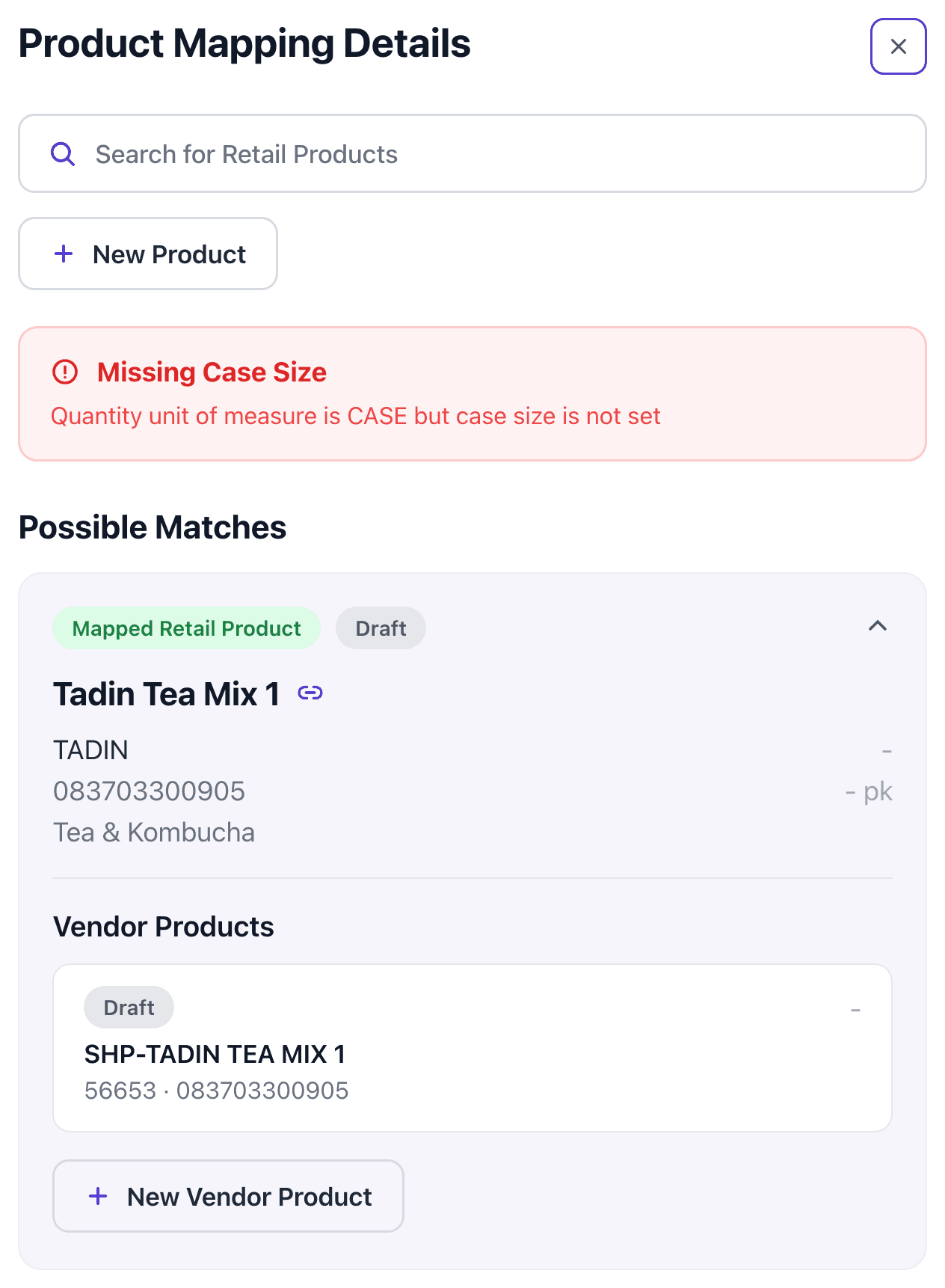
Everything lived in one scrolling panel. The vendor product sat nested under the retail product, warnings and badges competed for attention, and a grocer had to hunt for what to do next or what state a line was even in.
After
The flattened card

Same information, redrawn as one flat card. Retail and vendor sit as two clear rows, each with its own status, and the next action is obvious. It is easy to see where a line stands and what to do about it.
The Process
From stuck invoices to a flow you can undo.
Mapping the real failure points
I sat with grocers as they worked through invoices, traced where things stalled, and dug into how the system worked underneath. I also spent time with Vori’s internal teams, who were doing this work by hand and digging through dirty vendor data to pin down what had gone wrong. It was slow, manual work that ate into their day-to-day. The matching already happened behind the scenes, so the job was less about new logic and more about putting it in language grocers understood.
Prototyping scenario by scenario
Using Claude Design, I quickly built a clickable prototype covering the five real situations an item could land in: a clean match, an automatic match, choosing a vendor, an item code that clashed with another existing product, and a brand-new product with auto-created vendor. Then I tested the three dead-end cases directly, since those were the ones sending grocers to support.
Five real situations
A clean match, an automatic match, choosing a vendor, an item code that clashed with another product, and a brand-new product with an auto-created vendor.
The Build
Designing the moments where grocers got stuck.

The resolution panel
When an item needed a decision, this panel gave the answer that used to be a support ticket. It lists the likely matches and explains, in plain words, why each one came up.
Why it matched, spelled out: barcode, name, brand
The recommended pick open by default
Tap for more: department, price, recent sales
A clear “nothing matches, create new” option

Creating a new product
When nothing matched, grocers used to create a retail product and then track down or invent a vendor product to pair with it. That second step is where most duplicates came from. Now, for a brand-new product with no existing match, the vendor product is generated and linked automatically.
Create the retail product once
The matching vendor product is made and linked for you
No manual vendor step, so far fewer duplicates

Resolving a conflict
When a code was already attached to another product, grocers used to be fully stuck. This panel turns it into a simple choice they can make on their own.
“Move here” attaches the code to this product
Or send this item to the existing product instead
A plain reason for the suggestion, like “this product sells 7x more”
No support ticket required to get unstuck

The Apply step
Nothing saves while you work. Each decision is held as a draft, and a single Apply step gathers them all with a clear summary of what is about to happen.
Nothing saves until you apply
Undo any item before it lands
One screen groups every product, cost, price, and inventory change
A plain summary of what will change before anything saves
Final Solution
Prototype & flow.
A flow that lets grocers settle every item, see exactly what will change, and apply it all at once. Nothing saves until they say so, and a finished invoice moves straight on to receiving.
Step 1
Open an item that’s stuck
Step 2
Pick the recommended match
Step 3
Save it as a draft, with undo
Step 4
Review it all in one Apply step
Step 5
Send it on to receiving

The Impact
Grocers got unstuck on their own.
From usability testing and the first week after launch, measured with the engineering and product team.
of testers finished the hardest lines on their own, up from fewer than half.
fewer support tickets about stuck invoices, the top question the Vori team received.
of items settled on the recommended match, with no searching needed.
fewer duplicate products created along the way, which kept the data cleaner.
Key Takeaways
What I’d carry forward.
01
Step back from what people don’t care about. Grocers never thought in terms of the vendor side, so the win was making that step disappear most of the time, not teaching it.
02
A dead end is a design problem. Most duplicates came from people trying to escape a screen with no way out. Give them a real way out and the mess slows down on its own.
03
Let people see before they commit. Holding every change as a draft and showing exactly what would happen in one place turned a risky, hidden step into one grocers actually trusted.
© 2026 Ekekela Novero. All rights reserved.
Designed with care in San Francisco.